
Introducing react-components skill
August 23, 2026Avoid giving the same instructions to your agent, and guide it to follow best practices.
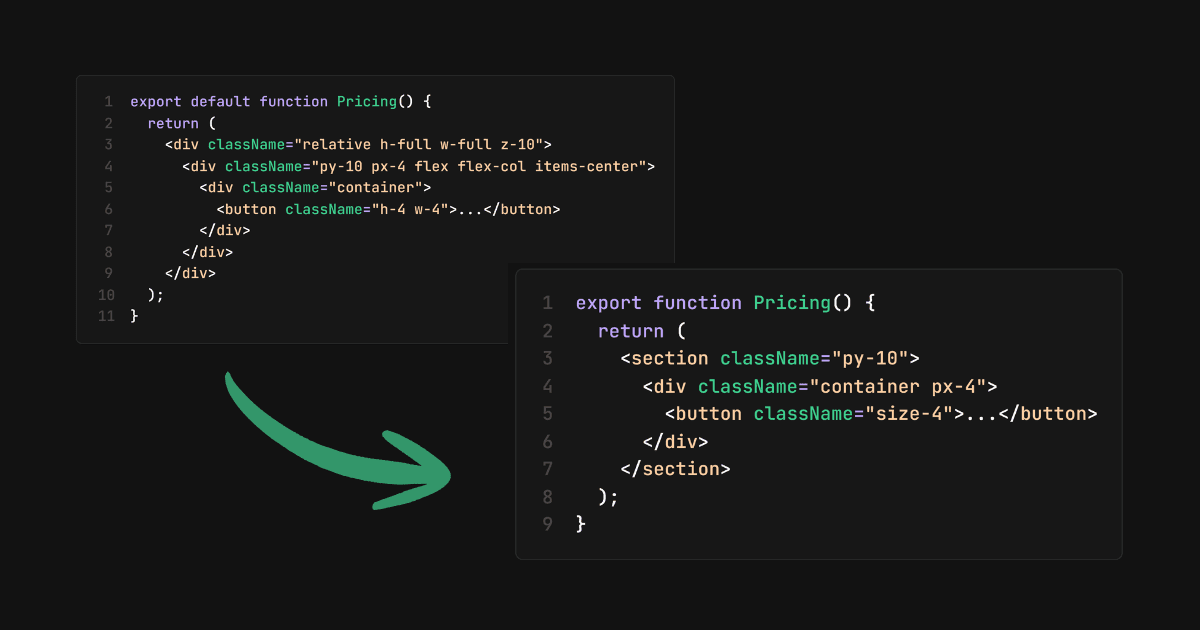
I just packed all of the frontend best practices I know into a skill file to reuse across projects. This skill is useful for building components in React + Tailwind CSS + TypeScript.
Why
Agents can code for you, so what's your role? Making sure it writes clean, scalable code, right?
That's something I had to address.
The problem with agents
Every time I work with agents on a new project, or even when I ask an agent to create a new component in an existing project, it doesn't follow best practices.
- It throws everything into one component file (data, UI, logic, etc.) and doesn't fully leverage the power of React components.
- Doesn't follow naming convention standards for file/folder names.
- Repeats Tailwind classes and JSX markup.
- Goes beyond the design system: sometimes uses arbitrary values in Tailwind classes and colors outside the design system.
- Creates div hell.
- Mixes up named and default exports.
- Doesn't organize imports, and doesn't remove unused ones.
So every time I had to give the same instructions to the agent, I got fed up and put all the best practices into a skill file.
What it solves
It fixes all the above problems and adheres to the patterns generally followed by senior frontend engineers.
Best practices for:
- Consistent file/folder structure and naming.
- Improved coding style: better Tailwind classes, organized imports, proper TS types (no
any). - No useless Tailwind classes like
relative,h-full,w-full, etc. - Uses the
cnutility function for dynamic classes. - Accessibility practices for interactive elements, icon-only buttons, etc.
There's a lot more. I won't list it all here or you'll get bored. If you're genuinely interested in reading it all, check it out on the GitHub repo.
How to use it
For now, you can copy-paste the file into your project and place it inside the .agents/skills/react-components directory.
Or you can ask your agent to pull it into your project from the GitHub repo:
https://github.com/heygauravshukla/skills/blob/main/skills/react-components/SKILL.md
If it doesn't seem to work, or your agent doesn't read it during a task, you can reference it inside your project's AGENTS.md file.
Closing thoughts
Give it a try and let me know how it went for you.
I have another post on agent skills. Give it a read if you're not familiar with how agent skills work.
Have a suggestion, want to add or remove some rules? Raise a PR or an issue on GitHub.
Happy coding!